This article will cover signing into the Sicon Mobile app.
Your company-issued mobile phone will have Sicon automatically installed. The app might not appear on your home screen, so try searching for it in the app library. If the app is missing, please contact Requests@cpcuk.co.uk.
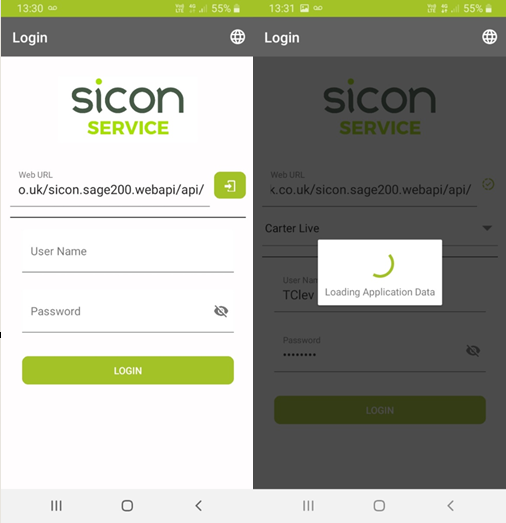
When opening the app, you should be greeted with three fields: Web URL, User Name, and Password. If the Web URL field is missing, press the globe icon in the top right.
Paste the following URL into the Web URL field:https://sicon.cpcuk.co.uk/sicon.sage200.webAPI/api/
Then press the enter icon to the right. It may take some time to sync. Once complete, click the dropdown and select "CPC Live".
Enter your username and password, then press Login.
Was this article helpful?
That’s Great!
Thank you for your feedback
Sorry! We couldn't be helpful
Thank you for your feedback
Feedback sent
We appreciate your effort and will try to fix the article