If you receive error messages there are a number of resolutions.
Issue: Error reception of stock reception
Alert the office, this will need to be resolved by overriding
(This occurs when stock that has not been on your van before is sent to you, an issue that the software developer doesn’t have a fix for)
Issue: server 500 errors are largely due to the appointment you are on being completed or changed in the office before you sync the data.
Contact the office and advise that data may be missing, report your hours /details manually.
To clear the error from Sicon to continue you must long press the entry that is causing the issue. Holding down the select allows ‘Delete’ entry to appear. It will be likely the top entry that can’t sync. Other entries can be selected and manually synced if required.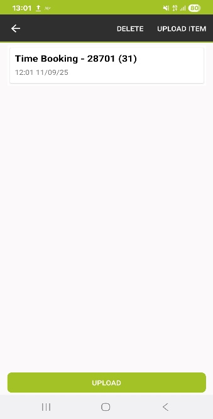
Was this article helpful?
That’s Great!
Thank you for your feedback
Sorry! We couldn't be helpful
Thank you for your feedback
Feedback sent
We appreciate your effort and will try to fix the article